Some of the best findings don’t come from a clever payload. They come from noticing that two files the application treats as “the same kind of thing” are actually served very differently. This was one of those. During an authorized assessment of a SharePoint application (tracked internally as WEB-PT-001), a plain file upload turned into stored cross-site scripting that executed in the SharePoint origin, and it worked precisely because of a header that wasn’t there.
This write-up describes testing performed with authorization against a scoped target. The hostnames in the screenshots are redacted. Only test systems you own or are explicitly permitted to assess.
The setup: document libraries accept uploads
SharePoint document libraries (/SiteAssets/, and others) let authenticated
users upload files. That is the whole point of a document library, so an upload
by itself isn’t a vulnerability. What matters is how the server hands those
files back to a browser when someone later opens them.
My account for this test was an ordinary low-privilege user: no admin, no site-collection rights. The question I always ask at an upload feature is simple: if I can store a file, can I make a victim’s browser execute it in this origin?
The usual defense and its gap
The first thing I tried was the obvious one: upload an .html file containing a
<script> block. SharePoint handled that case correctly. When I opened the
uploaded HTML file, the server sent it with:
Content-Type: text/html
Content-Disposition: attachment
That Content-Disposition: attachment is the defense. It tells the browser
“download this, don’t render it,” so the script never runs in the page. Plenty
of applications stop testing here and conclude the upload surface is safe.
But a SharePoint document library doesn’t only serve static files. It also serves
.aspx pages, and those are a different story.
The insight: .aspx renders inline
I uploaded the same idea as an .aspx file instead of .html. This time, when I
requested the file, the response was:
Content-Type: text/html
# (no Content-Disposition header at all)
No Content-Disposition: attachment. The page rendered inline, as live HTML,
in the SharePoint origin, and any script inside it executed. That single missing
header is the entire bug: .html is forced to download, .aspx is allowed to
run.
Here is the proof-of-concept page I uploaded. It is deliberately loud (a red
banner) and harmless: it reads the current user’s identity through SharePoint’s
own REST API and shows it in an alert():
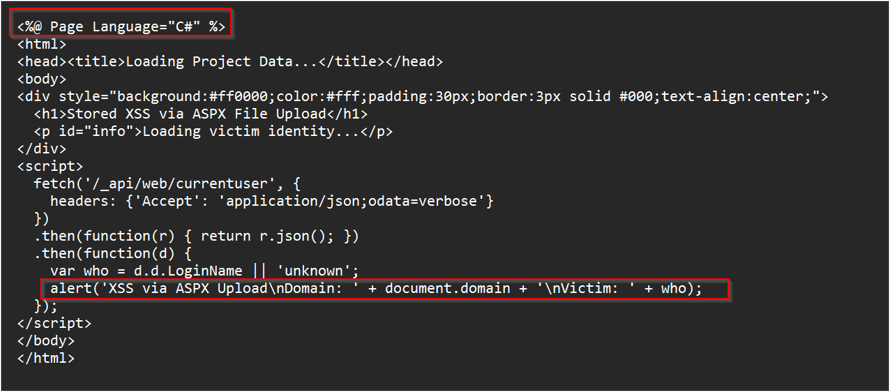
The important line is the fetch('/_api/web/currentuser') call. Because the page
runs inside the SharePoint origin, that request is sent with the victim’s
session automatically: the script is acting as the logged-in victim, not as an
anonymous outsider.
Uploading and triggering it
Uploading didn’t need any special tooling. SharePoint’s REST API accepts the file directly with a low-privilege session (I used Python with NTLM auth for the request):
POST /_api/web/GetFolderByServerRelativeUrl('/SiteAssets')/Files/Add(url='poc_xss_v40.aspx',overwrite=true)Then I simply opened the uploaded file in a browser:
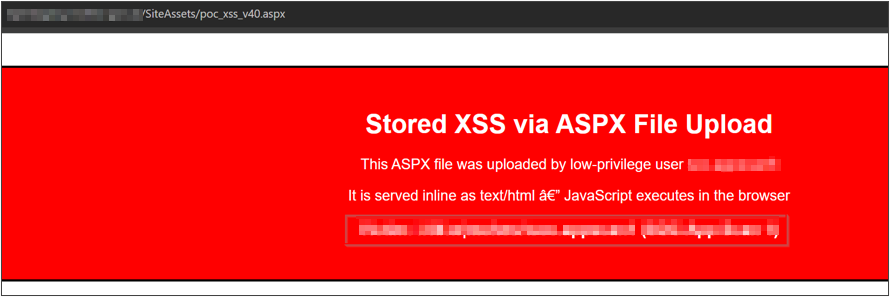
https://<redacted>/SiteAssets/poc_xss_v40.aspxThe page rendered inline as text/html, with no download prompt and no
Content-Disposition, and the script ran:
A moment later the payload confirmed code execution by reading the viewer’s
identity straight from /_api/web/currentuser and printing it back:
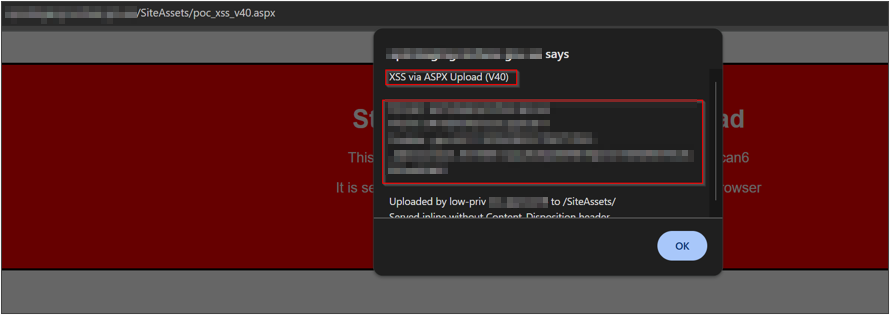
The popup shows what the script could see as the victim: the SharePoint domain, the login name, and account details, all pulled through the application’s own API, as the victim, from a file any low-privilege user was allowed to store.
Why this is worse than a “normal” HTML XSS
It’s tempting to file stored XSS as a single severity and move on. This variant deserves a closer look for three reasons:
- It bypasses the file-upload defense that was actually in place. The app
did set
Content-Disposition: attachmentfor HTML. The control existed; it just didn’t cover.aspx, so defenders could reasonably believe uploads were handled. - It executes in the SharePoint origin. The script isn’t in some sandboxed
preview; it runs with the same origin as the authenticated application, so it
can call internal APIs (
/_api/web/currentuser, list and file operations) with the victim’s session. - A low-privilege user can plant it. No admin rights are needed to store the file, and the victim only has to open a link to a document that looks like it belongs on the site.
A quick note on honesty, because it matters for impact: modern SharePoint auth
cookies are typically HttpOnly, so document.cookie usually will not hand
you the session cookie directly. That doesn’t save you: the real leverage isn’t
reading the cookie, it’s that the script can act as the victim through the
API from inside the origin, and can exfiltrate whatever it reads (identity, list
contents, document data) to an attacker-controlled endpoint. In testing, sending
a confirmation beacon out-of-band to a Burp Collaborator host is what proves
blind, stored execution even when no one is watching the alert box.
Impact
Chained together, a single uploaded .aspx gives an attacker, in the context of
anyone who opens it:
- Victim identity disclosure via
/_api/web/currentuser(name, login, email, admin status). - Authenticated API actions as the victim: reading or modifying content the victim can access.
- Data exfiltration of anything the script can reach, sent to an external collector.
That combination is why this came out as High (CVSS 8.2) rather than a routine reflected-XSS footnote.
Detection
If you’re defending SharePoint, look for the preconditions and the artifacts rather than the exploit itself:
- Uploads of server-executable extensions (
.aspx,.ashx,.asmx,.master) into document libraries by non-administrative users. - Responses from library paths served
Content-Type: text/htmlwithoutContent-Disposition: attachment. - API calls to
/_api/web/currentuserand file operations originating from a rendered library document, especially bursts following a new upload. - Outbound requests from user browsers to unfamiliar external hosts right after opening a document link.
Remediation
This is a quick win class of fix: the control already existed for HTML and simply needs to cover more cases.
- Send
Content-Disposition: attachmentfor.aspx(and other executable types) served from document libraries, exactly as the app already does for.html. This alone neutralizes the inline execution. - Block uploads of server-executable extensions for non-admin users. Treat
.aspx/.ashx/.asmxas code, not documents. - Deploy a strict Content Security Policy with a tight
script-srcso inline and injected scripts don’t run even if a file slips through. - Sanitize and validate uploaded content, and serve user uploads from an isolated origin where feasible so a rendered file can’t call first-party APIs.
Takeaway
The entire finding reduces to one sentence: the application knew .html was
dangerous and forced it to download, but served .aspx inline. Equivalent
inputs, unequal handling, and that gap is where the vulnerability lived. When you
test an upload surface, don’t stop at the extension the app clearly anticipated.
Ask how it serves every type it will accept, and watch the response headers, not
just the status code.